
OCR Pipelines for Finance: Receipts, Invoices, and Bank Statements
It is the last week of the quarter and your CFO has just dropped a stack of 1,847 receipts on the AP team's shared drive, all photographed at angles with iPhone cameras under bad fluorescent light, all needing to be reconciled against QuickBooks by Friday. The team's instinct will be to start typing. Two days into that approach you will be 30 percent done, half the receipts will be wrong, and someone will quit. The right answer is to build an OCR pipeline that does the typing for you and reserve human attention for the 5 percent of receipts that the machine is genuinely unsure about.
This guide is the production-grade playbook for finance OCR in 2026. It covers the engines worth considering, the image pre-processing that separates 80 percent accuracy from 97 percent accuracy, the parser logic that turns text into structured rows your accounting tool can ingest, and the human-in-the-loop quality control that prevents hallucinated dollar amounts from hitting the books. By the end you will have a pipeline that handles 1,000 receipts a month for about $50 in API costs and a few hours of weekly review.
Background: why receipt OCR is harder than it looks
OCR on a high-contrast scanned book page is a solved problem. OCR on a crumpled CVS receipt photographed under fluorescent light at a 30-degree angle is not. Receipts compress text into narrow columns with proportional spacing that confuses character segmentation, use thermal printing that fades into the paper after a few months, mix typefaces (often a sans-serif for line items and a different font for totals), and frequently include logos, barcodes, and promotional copy that the OCR engine must learn to ignore. The 95-percent-accuracy claims from cloud providers assume clean input. Your job is to provide clean input.
Why OCR accuracy lives or dies on the input image
Modern OCR engines like Tesseract 5, Google Document AI, AWS Textract, and Azure Form Recognizer all claim 95 percent-plus accuracy on clean documents. The catch is the word "clean." A receipt photographed under fluorescent kitchen light with the corner curled drops accuracy below 80 percent on Tesseract and into the high 80s on the cloud APIs. Five minutes of pre-processing per image can recover 10 to 15 points of accuracy, which on a 1,000-receipt month translates into hours of saved manual correction.
Step-by-step pipeline
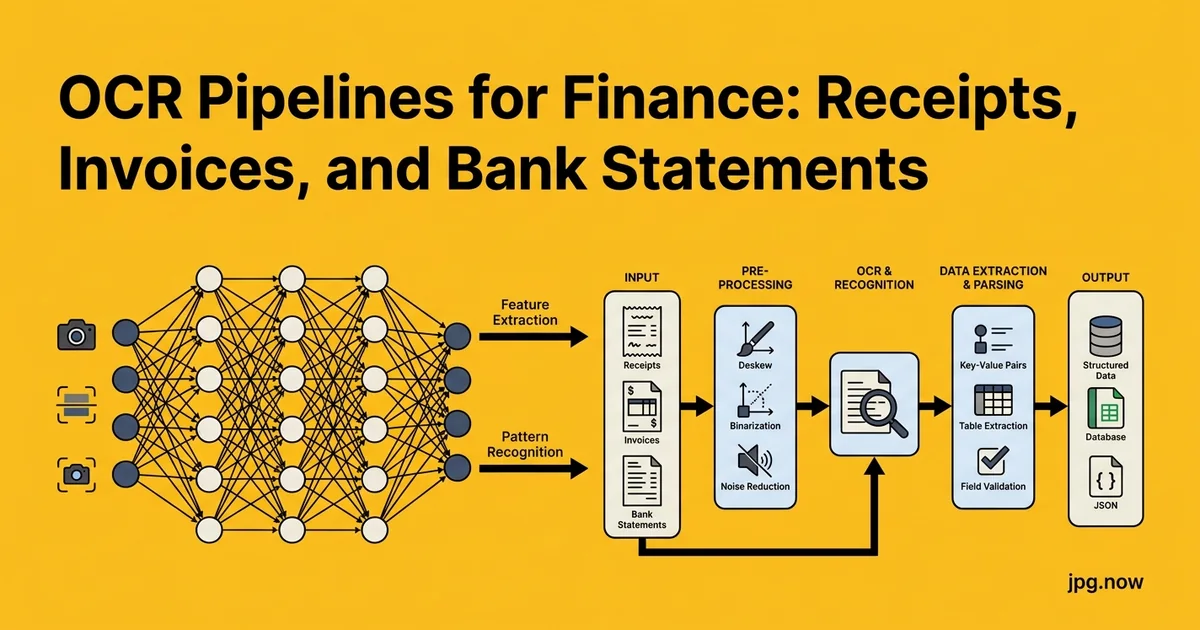
- Ingest. Watch a Drive folder or email inbox for new receipt files. Hash each file on intake for deduplication and audit.
- Normalize format. Convert HEIC to JPG with HEIC to JPG; split PDF statements into pages with PDF to JPG at 300 DPI minimum.
- Deskew and dewarp. Use OpenCV's Hough transform for deskew and a contour-based dewarp for curled receipts.
- Threshold and contrast. Adaptive thresholding (Sauvola) converts to clean black-and-white; CLAHE evens lighting.
- Compress for upload. JPG compression at quality 85 cuts file size 60 percent without OCR loss.
- Run OCR. Send to Google Document AI's invoice processor, AWS Textract, or local Tesseract depending on volume and cost.
- Parse to structured data. Extract vendor, date, amount, tax, line items via regex and named-entity recognition.
- Confidence check. Any field below 85 percent confidence routes to human review.
- Post to accounting. Push approved rows to QuickBooks or Xero via API.
Step one: convert everything to a normalized JPG
Standardize the input format before OCR. iPhone receipts arrive as HEIC and need HEIC to JPG conversion. Statement PDFs need to be split into pages with PDF to JPG at 300 DPI minimum, because OCR engines reading low-resolution scans confuse 5 and S, 0 and O, and 8 and B in dollar amounts. Anything below 200 DPI is a guaranteed disaster on small print like the line items on a CVS receipt.
Deskew, dewarp, and crop
Receipts and statements photographed at an angle need rotation correction. OpenCV's Hough transform finds the dominant text-line angle and rotates back to horizontal. Curled or folded receipts need dewarp, which is harder; commercial tools like ScanTailor or the dewarp model in Microsoft Lens handle this well. After deskew, crop tightly to the document body so the OCR engine is not distracted by background pixels. The aspect ratio tool helps you set consistent output dimensions if your downstream system expects them.
Contrast and binarization
Thermal receipts fade in months, and a faded receipt looks gray on gray to OCR. Bump contrast aggressively before extraction. Adaptive thresholding (Sauvola or Otsu) converts the image to pure black-and-white based on local windows rather than a global threshold, which preserves text in the dark band of a creased receipt while keeping the bright top crisp. CLAHE histogram equalization helps when lighting is uneven across the document.
Compression before sending to a cloud API
Cloud OCR APIs charge per page and many cap the request size. Compressing JPG at quality 85 with chroma subsampling disabled reduces file size by 50 to 70 percent with no measurable OCR accuracy loss. Document AI accepts up to 20 MB per request, but uploads above 5 MB add noticeable latency. Aim for 500 KB to 2 MB per page after compression.
Comparison: OCR engines for finance
| Engine | Cost per page | Accuracy (clean input) | Structured output | Self-hostable |
|---|---|---|---|---|
| Tesseract 5 | $0 (compute only) | 88-93% | No (text only) | Yes |
| Google Document AI | $0.05 (invoice) | 95-98% | Yes (invoice schema) | No |
| AWS Textract | $0.015 text / $0.05 forms | 94-97% | Yes (forms/tables) | No |
| Azure Form Recognizer | $0.05 (receipt) | 94-97% | Yes (receipt schema) | No |
| jpg.now image-to-text | Free tier | 90-94% | No (text only) | No |
Picking the right OCR engine for the job
Tesseract 5 is free, runs locally, and handles printed receipts and statements at 88 to 93 percent accuracy after good pre-processing. Google Document AI's invoice processor returns structured fields (vendor, total, line items) at 95 to 98 percent for around $0.05 per page. AWS Textract sits in the same band at $0.015 per page for text and $0.05 for forms and tables. For one-off needs, our hosted image-to-text tool covers the common cases without an account.
From extracted text to structured rows
OCR gives you a wall of text. Your accounting tool wants vendor, date, amount, category, tax. The gap is a parser that uses regex and named-entity recognition to find the patterns. Dollar amounts match `\$?\d{1,3}(?:,\d{3})*\.\d{2}`, dates match a handful of common formats, and the merchant name is usually the largest-font line near the top. Document AI and Textract do this step for you on common document types; for custom forms you write the rules.
Multi-page statements: split, OCR, recombine
A 47-page bank statement is easier to process as 47 individual JPGs. Split the PDF, OCR each page, then concatenate the extracted text in page order. If your downstream needs a searchable PDF, run OCR with the hOCR or PDF output flag and then use JPG to PDF to rebuild a single document with the text layer embedded. Tesseract's `pdf` output flag does this natively.
Common mistakes (and how to fix them)
- Mistake: trusting OCR confidence blindly. Engines report confidence per character, not per field. A 99% per-character confidence still means roughly 1 character wrong per 100, and that one character is often in the dollar amount. Fix: require multi-character confidence checks on numeric fields.
- Mistake: skipping deskew. A 10-degree skew can drop accuracy 8-12 percentage points. Fix: always deskew before OCR.
- Mistake: using one regex for all currency formats. European 1.234,56 differs from US 1,234.56. Fix: detect locale first, then apply the matching parser.
- Mistake: not handling multi-line line items. Some receipts wrap long product names across two lines. Fix: build the parser to join lines that lack a price.
- Mistake: no audit log. Fix: store the original JPG, the OCR JSON, and the final accounting entry as three linked records.
- Mistake: ignoring blank or duplicate pages. Fix: hash each page and skip duplicates; flag near-blank pages (under 100 detected characters) for review.
Real-world examples
Brex (expense management). Their receipt-matching pipeline uses a hybrid of Textract and proprietary models, automatically matching uploaded receipts to card transactions with around 92 percent first-pass accuracy.
Bench (bookkeeping). Their bookkeepers receive client receipt photos through a mobile app, run them through Document AI, and have a human review queue for any extraction with sub-90% confidence on the total or vendor.
Mid-sized SaaS finance team. A two-person AP team handles 8,000 vendor invoices per month with a pipeline of Drive ingest, Document AI extraction, and a custom Streamlit reviewer that lets each accountant approve or correct 40-50 invoices per hour.
Quality control before data hits the books
Never trust OCR blindly for financial data. Add a confidence threshold check: any field below 85 percent confidence flags for human review. Build a simple spot-check queue that shows the original image next to the extracted row, and let a clerk approve or correct in seconds. The 5 percent of receipts that need attention take a minute each; the other 95 flow through untouched. This is how a two-person AP team handles 10,000 receipts a month.
Handling multi-currency and international receipts
If your team books expenses across EUR, GBP, JPY, and USD, the parser needs locale awareness. European receipts use period for thousands and comma for decimal (1.234,56), which is exactly backwards from US conventions. Japanese receipts often have no decimal at all because yen is not divided. Train the parser to detect the currency symbol or three-letter code first, then apply the matching number format. The OCR step usually returns these characters correctly; the parser logic is where teams trip.
Advanced tips
- Pre-classify by document type. Run a tiny classifier first (receipt vs invoice vs statement) so you can route each to the right OCR schema.
- Use prompt-engineered LLM extraction for edge cases. When the structured engine fails, send the OCR text to Claude or GPT-4 with a JSON schema prompt and let the LLM extract the fields.
- Cache vendor patterns. Once you have processed 50 receipts from the same vendor, the merchant name and formatting are predictable. Save a per-vendor parser rule.
- Run OCR twice with different preprocessing. For high-stakes invoices, run once with Sauvola threshold and once with adaptive Otsu. Compare; flag any field that differs.
- Embed barcodes for tracking. Print a QR code on every internal receipt template so the OCR pipeline can identify the document type instantly.
- Build a "vendor master." A normalized list of known vendor names; fuzzy-match the OCR'd vendor against it to fix typos and inconsistencies.
- Audit a sample monthly. Pull 50 random processed receipts and manually verify the extraction. Track error rate over time as a quality KPI.
FAQ
How accurate is Tesseract really on receipts?
With good preprocessing (deskew, threshold, 300 DPI), Tesseract 5 hits 88-93% on printed thermal receipts. On clean scanned invoices, it can reach 95%+. Handwriting and very faded thermal print degrade it sharply.
Can I OCR handwritten receipts?
Document AI and Textract handle some handwriting; Tesseract handles almost none. Realistically, handwritten content needs a vision LLM (Claude, GPT-4V) at much higher cost.
What about non-Latin scripts?
Document AI and Textract handle Chinese, Japanese, Korean, Arabic, Cyrillic, and many others. Tesseract supports 100+ languages but quality varies. Configure the language pack matching your input.
Is it GDPR-compliant to send receipts to a cloud API?
Yes if you have a DPA with the provider and the receipts contain only your business data. For PII-heavy documents, use a region-locked endpoint (e.g., EU-only) or self-host with Tesseract.
How long should I retain the original image?
Most jurisdictions require 7 years for tax-related documents. Store the original JPG alongside the structured extraction, both as immutable records.
Can I run this on-premise?
Yes with Tesseract or PaddleOCR. Expect lower accuracy than cloud and a larger ongoing engineering investment. Worth it only for regulated environments where data cannot leave your network.
What about email-attached PDFs?
Treat them as a regular input. Split the PDF, OCR each page, and merge the results. Many invoices arrive as multi-page PDFs and the pipeline handles them identically.
The economic case for investment
A two-person AP team manually processing 1,000 invoices per month spends roughly 80 hours on data entry. At a fully loaded cost of $50 per hour, that is $4,000 per month or $48,000 per year in labor. The OCR pipeline reduces this to 10-12 hours per month for review, freeing 70 hours per month for higher-value work. Even at $50 in API fees per month, the ROI is enormous. The reason teams hesitate is not the math; it is the engineering time to set it up, which a one-week sprint covers.
Audit trail and compliance considerations
Financial OCR pipelines need an audit trail beyond what most automation platforms provide by default. Store the original image (immutable), the OCR JSON output (immutable), the parsed structured data (versioned), and any human edits (versioned with reviewer ID). When an auditor or your CFO asks "where did this expense category come from?" you can show the original receipt, the OCR text, the parser output, and any human override in seconds. Without this trail, you are arguing about data your accounting tool says one thing and nobody can prove the original receipt said something else.
SOX and SOC 2 implications
If your company is public or pursues SOC 2 certification, AP automation falls under financial controls scope. Auditors will ask about access controls on the OCR pipeline, segregation of duties (the person posting an entry should not be the same person approving it), and the immutability of original documents. Building these controls in from day one is much easier than retrofitting them later. Most cloud OCR providers offer SOC 2-compliant tiers; use those rather than the consumer-grade endpoints.
The case for hybrid extraction
The strongest pipelines combine structured OCR (Document AI for the common 80%) with LLM-based extraction (Claude or GPT-4 for the weird 20%). Structured engines are fast and cheap but brittle on unusual layouts. LLMs are slower and more expensive but graceful on edge cases. Route by confidence: if Document AI returns high confidence, accept it. If confidence drops, send the OCR text to an LLM with a JSON schema prompt and a few-shot example. The hybrid approach typically catches another 5-7 percentage points of extraction accuracy at modest extra cost.
Integrating with QuickBooks and Xero
Both QuickBooks Online and Xero have well-documented APIs that accept programmatic expense entries. The pattern: OCR returns structured JSON, your code maps vendor/amount/date/category to the API's schema, you POST to the create-bill endpoint, and the entry appears in the accounting tool with a link back to the original image. This last link is critical for review and audit; without it, the bookkeeper opens an entry, sees a dollar amount, and has no way to verify against the source.
A working stack you can copy
For most finance teams: ingest via shared Drive or email, normalize with HEIC and PDF conversion, deskew and threshold in OpenCV, send to Document AI for structured extraction, post the JSON to QuickBooks or Xero via their API. Total cost at 1,000 documents a month is roughly $50 in API fees plus the storage. Compare this to two hours a day of manual entry and the ROI is obvious. Browse the rest of our tools for the conversion, compression, and inspection steps.
Start small: pick the 50 most recent receipts on your desk, run them through HEIC to JPG, compression, and OCR, and see where the pipeline breaks. Fix that one thing, then scale. By the end of the month you will have a working AP system that costs less than a half-day of manual data entry.