
Stable Diffusion vs Midjourney Production Pipelines
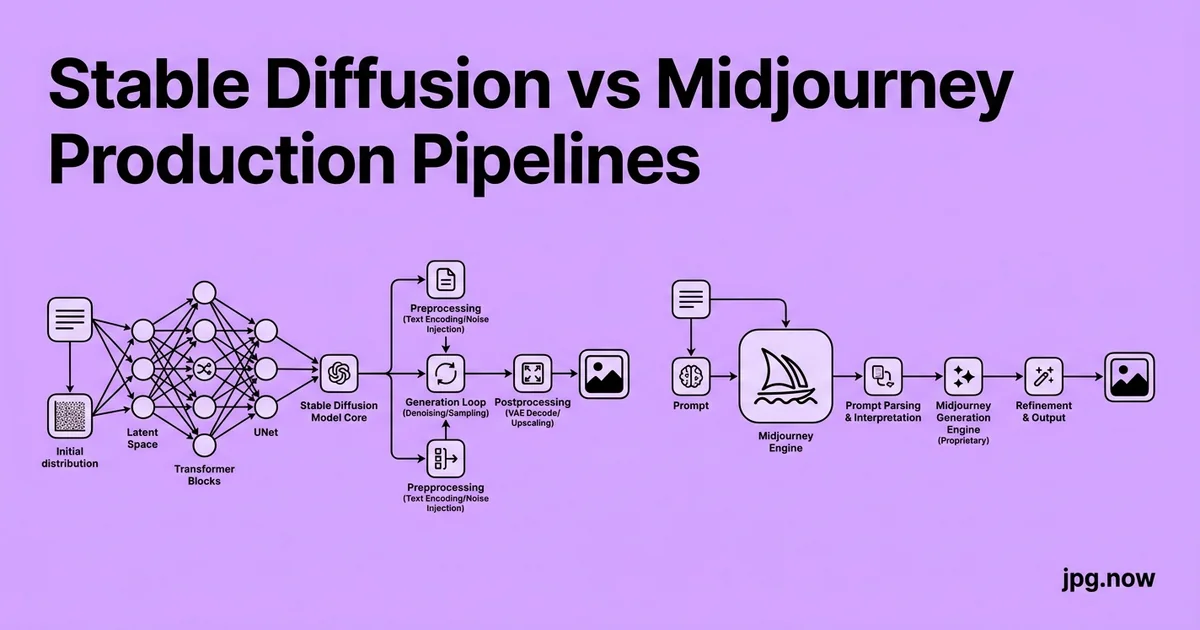
The agency creative director needs 240 product hero images for a Q3 launch, all consistent with the brand book, all delivered Friday. Your only constraint: the brand has a specific lighting style across hero shots that took the in-house photographer four years to develop. Midjourney can match the look on a hero or two. Midjourney cannot match the look on 240. You sit down on Monday morning and have to decide which AI image platform to build the pipeline on. The wrong call costs you the week.
The question is not whether Stable Diffusion or Midjourney produces better images. Both produce ship-ready work in 2026 for most commercial briefs. The real question is which one fits the production pipeline you actually need to run one-off hero images on tight turnarounds, or repeatable batches of brand-consistent assets across hundreds of frames. The answer is usually both, in different positions in the workflow, and knowing where each belongs saves hours per project.
The fundamental architectural difference
Midjourney is a closed, opinionated service that hides the model, the sampler, and the post-processing from the user. You write prompts; it returns finished images. Stable Diffusion is an open ecosystem where everything model, sampler, scheduler, ControlNet, LoRA, IP-Adapter, VAE, upscaler is exposed and replaceable. This architectural choice drives every downstream difference: speed of getting one image, ceiling of pipeline customisation, hardware cost, and team-scaling.
Midjourney's strengths in production
Midjourney v7 is the fastest path from prompt to broadcast-quality hero image. The aesthetic floor is high even a sloppy prompt produces an image with deliberate lighting, considered composition, and color harmony. Iteration is conversational: vary, remix, reroll, upscale. A junior designer can produce a usable hero in 15 to 30 minutes without deep prompt engineering.
The constraints are real:
- No fine-tunes; you cannot teach Midjourney your brand or character
- Character Reference (cref) is good but not pixel-consistent across multiple frames
- No ControlNet equivalent for pose or composition control
- API exists but is restrictive; most teams still run Midjourney through Discord
- No batch-prompt automation beyond what /imagine syntax allows
Stable Diffusion's strengths in production
Stable Diffusion (including Flux, which uses the same broader ecosystem) is the only major platform with a serious automation story. ComfyUI workflows chain dozens of nodes into deterministic pipelines: load model, apply LoRA, generate base, inpaint mask, upscale, color match, export. The same pipeline runs against 500 prompts overnight on a single 24 GB GPU and produces 500 brand-consistent assets by morning.
The constraints are different:
- Steep learning curve ComfyUI graphs are unfamiliar to most designers
- Hardware investment of $2,000 to $5,000 for a serious local rig, or $0.50 to $3 per hour on cloud GPUs
- Quality without good prompt engineering and the right model/LoRA combo is mediocre
- License terms vary by model some popular checkpoints are non-commercial
- Initial pipeline setup takes 2 to 5 days; payoff comes from scale
When to choose Midjourney
- Hero images, one-offs, mood pieces
- Pitch decks, mood boards, internal concepting
- Small teams without dedicated AI engineers
- Projects with budget but not time
- Editorial work where each image is unique
When to choose Stable Diffusion
- Asset batches of 50 or more with consistent style
- Brand work where a custom LoRA captures the brand aesthetic
- Character-driven work comics, game assets, recurring mascots
- Pipelines that need ControlNet for pose, depth, or edge-guided generation
- Pipelines that need to run unattended overnight
The production pipeline that uses both
Mature teams in 2026 use both platforms in distinct roles within a single pipeline. The pattern looks like this:
Stage 1: Concept in Midjourney
Generate 8 to 16 variations in Midjourney to lock the visual direction. Approve one as the reference. This stage takes 30 to 60 minutes and benefits from Midjourney's aesthetic floor.
Stage 2: Replicate in Stable Diffusion
Train a small LoRA on the approved Midjourney reference (10 to 30 images for a basic style LoRA). Or use IP-Adapter to pass the Midjourney reference into Stable Diffusion as a style anchor without training. This gives you a generation pipeline that can reproduce the Midjourney look in batch.
Stage 3: Generate at scale
Run the prompt list through ComfyUI overnight. Output is 500 to 2,000 frames at 1,024 to 1,536 resolution depending on GPU and model.
Stage 4: Inpaint and fix
Use Stable Diffusion's inpaint workflow to fix specific issues hands, text, brand elements without regenerating the whole frame. ControlNet-Inpaint preserves the composition while replacing only the masked area.
Stage 5: Background work
Run frames that need isolated subjects through the background remover for clean cutouts. Faster and cleaner than Stable Diffusion's built-in segmentation for production work.
Stage 6: Upscale to delivery resolution
Stable Diffusion's tiled upscale workflows handle the bulk. For final hero frames that need extra cleanup, the AI upscaler as a second pass adds sharpness without re-hallucinating texture.
Stage 7: Export presets
Convert the final PNG outputs to JPG at the resolutions clients actually want. Three tiers cover most agency briefs:
- Web hero: 1,920 x 1,080 or 2,560 x 1,440, JPG quality 85, sRGB
- Social: 1,080 x 1,350 (4:5) and 1,080 x 1,920 (Stories), JPG quality 85
- Print-adjacent: 3,000 to 4,000 px on the long edge, JPG quality 92, sRGB or Adobe RGB
Run all outputs through the JPG compressor at quality 85 for web tiers to drop final delivery size by 30 to 45 percent without visible degradation.
Common pipeline mistakes
- Skipping the concept phase. Going straight to batch generation on Stable Diffusion produces 500 frames in the wrong style. Fix: lock the visual direction in Midjourney first.
- Training a LoRA on too few images. 3 to 5 reference images produce overfit LoRAs that only generate the literal references. Fix: 15 to 30 varied images, ideally same subject in different poses and lighting.
- Ignoring license terms on community models. Many Civitai checkpoints carry restrictive commercial terms. Fix: read every license before commercial use.
- Running pipelines without seed control. Failed batches cannot be debugged without reproducibility. Fix: log every seed alongside the output.
- Delivering raw model output. Clients expect cleaned-up files. Fix: always run through cleanup (upscale, background, compression) before delivery.
- Building the pipeline in production. Two weeks of debugging while the client is waiting. Fix: build and test the pipeline on a previous brief first.
Practical pipeline shape in ComfyUI
A typical "Midjourney-anchored Stable Diffusion" workflow in ComfyUI has roughly 30 to 50 nodes:
- Load checkpoint (SDXL or Flux Dev/Schnell)
- Load LoRA (brand style or character)
- Load reference image via IP-Adapter
- CLIP text encode positive and negative prompts
- Sampler (Euler, DPM++ 2M, or a-variants)
- VAE decode
- First-pass output at 1,024 base
- Mask generation for face/hand inpaint
- Inpaint pass with ControlNet
- Tiled upscale to 2,048 or 3,072
- Color match against reference
- PNG save + metadata embed
Build this once. Save it. Reuse it across projects with only the prompt and LoRA changing.
Three real-world pipeline examples
Game studio, indie, 8-person team. Uses Midjourney for environment concepting (1 to 2 hero pieces per environment), then a fine-tuned Stable Diffusion XL pipeline with a custom LoRA trained on the approved environments to generate 30 to 80 additional in-engine reference images per environment. Total time per environment dropped from 3 days to 6 hours.
E-commerce, 800-SKU furniture catalog. Used Midjourney for the brand-defining hero shots (12 images, 2 days of work). Trained a LoRA on those 12 images. Then ran a ComfyUI pipeline generating staged lifestyle photos for every SKU, 8 variations each. 6,400 final images delivered in 9 days; would have been 6 months of studio time.
Children's book illustrator, solo. Concepted main character in Midjourney with --cref, exported references, trained a tiny Flux LoRA, generated 40 illustrations for a 32-page book in 4 days. Used the AI upscaler for print-quality 300 dpi at book size, then image converter to deliver PDF-ready files.
Comparison table for pipeline decisions
| Factor | Midjourney v7 | Stable Diffusion / Flux |
|---|---|---|
| Time to first image | 30 seconds | 2 to 5 days setup + 30 seconds |
| Aesthetic floor | Excellent default | Variable, model-dependent |
| Brand consistency at scale | Weak (no fine-tune) | Excellent with LoRA |
| Character consistency | Good with --cref | Excellent with LoRA |
| Pose / composition control | Limited | ControlNet, IP-Adapter |
| Cost per image | ~$0.10 to $0.40 | ~$0.01 to $0.05 (own GPU) |
| Team scaling | Designer-friendly | Requires ML literacy |
| License clarity | Clear paid tiers | Variable per model |
Verifying brand consistency across batches
The biggest risk in batched generation is style drift the 30th frame looks meaningfully different from the 1st. Audit by sampling 5 to 10 frames from each batch and dropping them into the image comparison tool at the same crop and zoom. Color and texture drift becomes obvious within seconds. If drift is unacceptable, lower the sampler steps or strengthen the LoRA weight and rerun.
License watch in 2026
- Midjourney commercial use requires Standard plan ($30/mo) or higher
- Stable Diffusion XL is permissive; check individual checkpoint and LoRA licenses
- Flux Dev is non-commercial without a paid license; Flux Schnell is Apache 2.0
- IP-Adapter and ControlNet are open and free for commercial use
- Some Civitai LoRAs carry restrictive terms read each one
Advanced pipeline techniques
- Multi-LoRA stacking combine brand LoRA, character LoRA, and lighting LoRA at different weights for layered control.
- Regional prompting ComfyUI nodes can apply different prompts to different image regions for complex compositions.
- Latent space interpolation generate a smooth sequence between two images for animation or progressive variation.
- Face-aware inpaint dedicated face-restoration models (GFPGAN, CodeFormer) integrated as ComfyUI nodes.
- API-driven generation for very high volume, hosted Stable Diffusion APIs (Replicate, RunPod) can batch-process without local GPU.
- Distributed generation across multiple GPUs ComfyUI now supports multi-GPU node setups for higher throughput.
- Use the AI upscaler as a finisher regardless of platform.
The 5-day setup checklist for a new agency pipeline
- Day 1: Midjourney concepting pass for visual direction
- Day 2: LoRA training or IP-Adapter reference setup on Stable Diffusion
- Day 3: ComfyUI workflow build and dry-run on 10 frames
- Day 4: 100-frame batch test and quality audit
- Day 5: Export, compression, and delivery preset templates locked in
Frequently asked questions
Can I skip Midjourney entirely and just use Stable Diffusion?
Yes, but expect the concepting phase to take 2 to 3 times longer because Stable Diffusion's default aesthetic is weaker. Many teams prefer paying for Midjourney's $30/month to shorten the concept phase.
What GPU do I need for serious Stable Diffusion work?
24 GB VRAM (RTX 3090, 4090, 5090, or A6000) handles SDXL and Flux Dev comfortably. 12 GB (RTX 3060, 4070) is acceptable for SDXL but tight for Flux. Less than 12 GB is impractical for production work.
How long does a LoRA take to train?
1 to 4 hours on an RTX 4090 for a small style LoRA (15 to 30 images). Longer for character LoRAs that need more examples. Cloud training on Replicate or RunPod takes similar time at $1 to $5 cost.
Can ComfyUI workflows be shared across machines?
Yes, workflows export as JSON and import on any other ComfyUI install. You will need the same model checkpoints and LoRAs present on the target machine.
What is the difference between Stable Diffusion and Flux for production?
Flux generally produces more photorealistic output with better prompt adherence. Stable Diffusion XL has a larger ecosystem of community LoRAs and ControlNets. For brand-consistent character work, SDXL usually still wins on tooling.
Should I use Automatic1111 or ComfyUI?
ComfyUI for production pipelines because it is node-based, reproducible, and scriptable. Automatic1111 (now Forge) is friendlier for interactive exploration but harder to systematise.
How do I keep up with the AI generation field?
Civitai for model and LoRA releases, ComfyUI community Discord for workflow sharing, r/StableDiffusion for daily news. The field still moves fast enough that monthly check-ins beat trying to follow daily.
Cost modelling for a pipeline build
Before committing to a Stable Diffusion pipeline, model the cost honestly against Midjourney equivalents. A typical Midjourney Standard plan ($30/month) generates roughly 600 fast-mode images per month and unlimited relax-mode. At $0.05 average effective cost per usable image. A Stable Diffusion pipeline on a self-hosted RTX 4090 ($1,800 hardware) generates effectively unlimited images at the marginal cost of electricity (call it $0.01 per image at typical batch density). The break-even for hardware is roughly 36,000 images. For agencies generating that volume per year, the hardware pays back in months. For solo creators generating 100 to 500 images per month, Midjourney remains cheaper even three years out.
Cloud GPU options (RunPod, Replicate, Modal) split the difference: roughly $0.50 to $3 per hour of GPU time, sufficient for 200 to 1,000 images depending on model and resolution. Cloud is the right answer for sporadic high-volume needs without sustained throughput.
Team structure and roles around the pipeline
The mature pipeline involves three roles. The art director sets visual direction in Midjourney during concepting and approves Stable Diffusion batches against the brief. The pipeline engineer maintains ComfyUI workflows, LoRAs, and infrastructure; often a senior designer with technical skills rather than a dedicated ML engineer. The production designer runs the prompt list, audits batches, and handles export through the image converter and JPG compressor for delivery. Smaller teams collapse these into one or two roles; large agencies separate them clearly.
Quality assurance at scale
Once you are generating hundreds or thousands of images per project, manual review of every frame becomes impractical. The QA discipline that scales involves three layers. First, automated pre-filters via simple Python scripts that flag images with broken faces (using a small face-detection model that throws confidence below threshold), images with text that should not contain text, and images outside expected colour gamut for the brand. Second, sampled human review of 5 to 10 percent of each batch with attention to the categories the automated filters do not catch (composition, brand alignment, off-brief content). Third, final approval review by the art director on the curated keepers.
This three-layer QA structure typically catches 99 percent of problems while requiring human attention on only 10 to 15 percent of the total output. For a 2,000-frame project, that is roughly 200 to 300 images requiring real human review rather than 2,000.
Iteration loops and the cost of bad batches
The most expensive mistake in Stable Diffusion pipelines is running a 1,000-frame overnight batch and discovering at 9 a.m. that the LoRA weight was too high and every frame is unusable. Add cheap pre-flight checks to the pipeline: a 10-frame test batch before the full run, with diversity across the prompt space, that surfaces obvious problems for 5 minutes of GPU time rather than 8 hours.
Maintain a regression test set of prompts that should produce known-good output with the current pipeline. Run this set after any LoRA update, model swap, or ComfyUI version bump. Catching pipeline drift early prevents the production-day surprise of "the workflow that worked last week is broken now."
Once the pipeline exists, the marginal cost of the next 1,000 images is mostly GPU electricity and a few minutes of prompt list editing. Push a single output through the image converter and the JPG compressor to confirm your delivery format is correct before scaling. Check the full tools index for the post-generation cleanup work background removal, upscale, comparison, compression that turns raw model output into client-ready files. The background remover, AI upscaler, and comparison tool are the most common companions to the pipeline.