
Background Removal at Scale: APIs, Self-Hosted, and Cost per 10,000
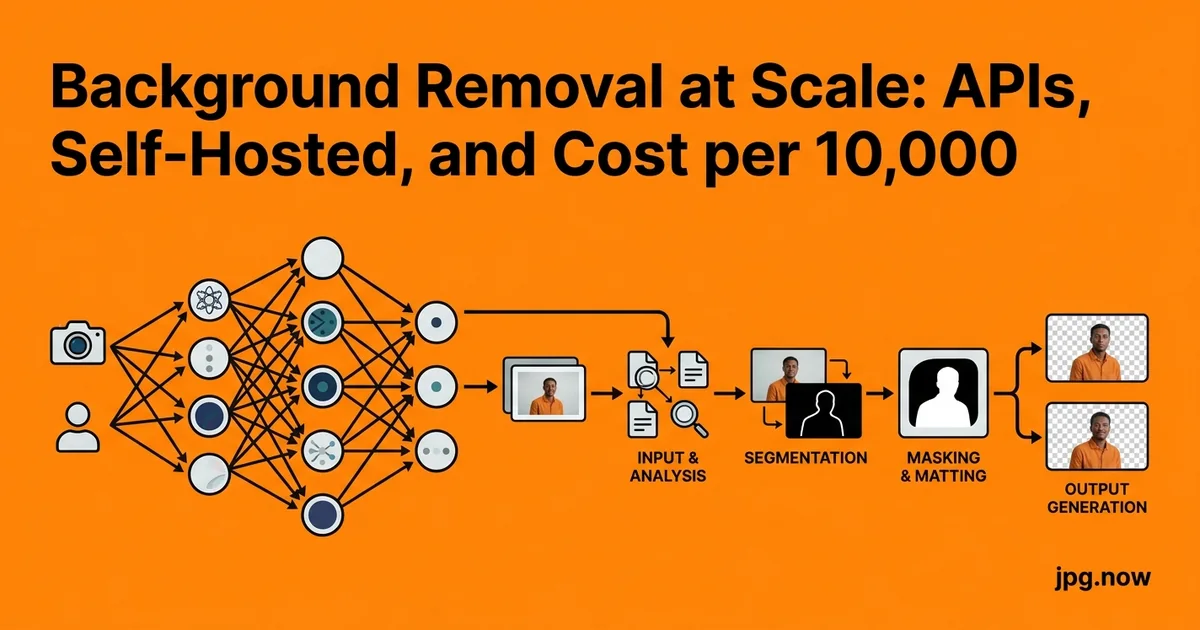
It is 11:14 on a Tuesday morning and the merchandiser sitting two desks down has just dropped a folder of 8,400 product JPGs onto your shared drive with a one-line Slack message: "needs cutouts by Friday for the spring drop." You open the folder, count the SKUs, look at the cost of paying your retoucher to do this by hand, and immediately start pricing background removal APIs. The math is brutal either way. A boutique retoucher at $1.50 per image lands at $12,600. A junior on staff at 90 seconds per image needs 210 hours, which is most of two work-weeks. The API route looks cheap until you start adding up what "cheap" actually means once you have run a few real batches and seen the edge halos.
This guide is the one we wish we had when we ran our first 10,000-image batch. It compares the four routes most teams actually consider, breaks down the real cost per 10,000 images, lays out a step-by-step pipeline that survives contact with messy product photography, and calls out the mistakes that cost us afternoons of rework. By the end you will know which engine to start with, how to benchmark them against your own catalog, and how to architect the pipeline so that next quarter's "can we redo all the backgrounds in light gray?" request takes ten minutes instead of ten thousand API calls.
Background and context: why this stopped being a manual job
Until about 2020, the realistic options for catalog background removal were a Photoshop action a senior retoucher tuned, an offshore team paid per cutout, or a desktop plugin like Topaz Mask AI. The hosted-API category did exist (remove.bg launched in 2018), but the edge quality on hair, fur, and thin metal was not good enough for premium product photography. Things changed fast between 2021 and 2023. Photoroom shipped a model specifically trained on e-commerce product shots. remove.bg's "object" segmentation model caught up on jewelry. Open-source IS-Net and BiRefNet started matching commercial quality on benchmarks. By 2024, the conversation shifted from "can the API do this?" to "which API is the right fit for our catalog?"
One image in a browser-based background remover is trivial. Ten thousand is a different problem because three new constraints appear: queue throughput, edge consistency across visually similar products, and the cost of re-running everything when you change your mind about the cutout style. A 0.4-second-per-image difference between two engines means 67 extra minutes of clock time across a single batch of 10,000, and a $0.02-per-image price gap turns into $200 per run.
Step-by-step: building a production pipeline
- Normalize the input. Convert any HEIC, PNG, or TIFF source into a consistent JPG with our image converter. Mixed inputs cause silent failures in some engines.
- Bucket by category. Group SKUs by shot type (hair, jewelry, apparel, glass, electronics). Different categories may route to different engines or different category hints.
- Run the cutout API. Send each JPG to the chosen engine with an appropriate category hint. Save the returned alpha mask as a separate PNG artifact next to the original.
- Composite to the target background. For Amazon main images, composite to pure white (#FFFFFF). For your own storefront, composite to whatever your design system specifies. Keep the alpha-only mask cached separately.
- Resize and pad. Use the aspect ratio calculator to lock to a consistent canvas (typically square 2000x2000 for storefronts).
- Compress. Run final output through JPG compression targeting 200 to 400 KB per image.
- Generate format variants. Produce WebP and AVIF versions for modern browsers; keep the JPG as fallback.
- Verify and ship. Spot-check 1 percent of outputs against the original. Push the finished set through your CDN.
remove.bg: the baseline most teams start with
remove.bg charges roughly $0.20 per HD image on the pay-as-you-go plan and drops to about $0.09 per image on the 10,000-credit subscription. The API returns a transparent PNG, which means you almost always want to chain a JPG compression or PNG re-encode step downstream depending on whether your storefront needs transparency. Edge quality on hair, fur, and translucent fabric is the best of the hosted options for general subjects, but it sometimes over-erases thin metal stems on jewelry and dark wire on electronics product shots.
Photoroom: catalog-tuned and cheaper at volume
Photoroom's API is priced at roughly $0.02 to $0.09 per call depending on the tier and is specifically tuned for e-commerce product photography. It handles white-on-white shots, shadows beneath shoes, and reflective glass noticeably better than remove.bg for SKU-style work. You can also pass a category hint such as person, product, or car, which tends to improve cutout accuracy by a few percent on tricky edges. Many teams pair Photoroom with an image converter to normalize output dimensions and a compression step before pushing to the CDN.
Cloudinary's AI background removal addon
Cloudinary bundles background removal as a transformation flag, which sounds convenient until you read the pricing. Each background-removal transformation counts as a separate billable operation, and at $99 for 5,000 operations on the lowest paid tier the per-image cost lands near $0.02 in volume. The real benefit is workflow: the cutout lives next to your other transformations, so resizing, compression, and format negotiation against WebP and AVIF happens in the same URL. The downside is vendor lock-in and slightly weaker edge quality than Photoroom on hair and fine detail.
Self-hosted U-2-Net: free per image, expensive per hour
U-2-Net is an open-source salient-object detection model that produces respectable cutouts when fine-tuned. On a single NVIDIA T4 GPU at roughly $0.35 per hour, you can push about 25,000 images through per hour at 512x512, which works out to about $0.000014 per image in raw compute. That number is misleading because it ignores engineering time, model maintenance, edge-case fallback, the cost of retraining when a new product line breaks the model, and the realization that for fashion or hair you will probably want IS-Net or BiRefNet rather than vanilla U-2-Net.
Honest cost per 10,000 images
Pulling the numbers together for a single batch of 10,000 product JPGs:
| Engine | Per-image cost | Cost for 10,000 images | Edge quality (1-10) | Setup time |
|---|---|---|---|---|
| remove.bg (PAYG) | $0.20 | $2,000 | 9 (hair/fur) | 1 hour |
| remove.bg (sub) | $0.09 | $900 | 9 | 1 hour |
| Photoroom API | $0.02-0.09 | $200-900 | 9 (product) | 2 hours |
| Cloudinary addon | $0.02 | $200 | 7 | 3 hours |
| Self-hosted U-2-Net | $0.000014 + dev | $1-5 + 40hrs dev | 6-8 | 1-2 weeks |
Below 50,000 images a year, hosted is almost always cheaper than self-hosted once you include the engineering hours.
Common mistakes (and how to fix them)
- Mistake: delivering transparent PNGs to every channel. Amazon main images require pure white at #FFFFFF, not alpha. Fix: always composite cutouts onto the channel-specific background and export as JPG for those channels.
- Mistake: re-running the expensive cutout when the background spec changes. Fix: cache the alpha mask separately so re-composites cost milliseconds, not API calls.
- Mistake: choosing an engine based on one demo image. Fix: run a 50-image benchmark across your hardest categories before committing.
- Mistake: ignoring rate limits. Most APIs cap at 60-200 requests per minute. Fix: batch with a 500 ms delay between calls.
- Mistake: not normalizing input formats. HEIC iPhone photos and unusual color profiles cause silent failures. Fix: convert all inputs to JPG sRGB first.
- Mistake: skipping a confidence threshold. Fix: flag any cutout where the engine's confidence score drops below 0.85 for manual review.
Real-world examples
Allbirds (footwear). Their main product photography uses a white seamless and shoes shot at a 45-degree angle. They switched from manual retouching to Photoroom for the catalog refresh in 2023, processing roughly 1,200 SKUs and reporting that edge quality on white-on-white was the deciding factor over remove.bg.
Allswell (mattresses). Mattresses are a deceptively hard category because of soft fabric edges and large flat planes that look identical to backgrounds. Allswell's team built a hybrid pipeline using Cloudinary's transformation API for the variants and a manual review step for the hero shots.
Ssense (luxury fashion). A self-hosted IS-Net deployment because their catalog is large enough (40,000+ SKUs refreshed seasonally) and their edge-quality bar high enough that the engineering investment pays back within a single season.
Edge quality benchmarks you can run yourself
Pick 50 representative product shots that include the hardest categories you actually sell: long hair, mesh, glass, jewelry, dark-on-dark fabric, and white-on-white. Run all four engines, composite each result onto a 50% gray background, and grade them on edge halo, missed pixels, and over-erasure. This 200-image test takes about an hour and saves you from picking an engine based on the demo image their marketing team chose. Use the side-by-side compare tool to flip between outputs at 100% zoom.
What the output actually needs to look like
The mistake teams make most often is delivering 24-bit PNGs with alpha to every channel, regardless of whether that channel needs transparency. Amazon main images require pure white backgrounds at #FFFFFF, not transparency. Many marketplaces silently composite alpha onto a default gray. Run the cutout, then composite back to white and re-export as a high-quality JPG for those channels. Use the image info inspector to confirm the JPG carries no rogue color profile and the file-size estimator to budget the download weight per product page.
Caching and reprocessing strategy
Store the original input JPG, the raw alpha mask, and the final composited output as three separate artifacts. When marketing decides next quarter that the background should be #F7F7F7 instead of pure white, you re-composite from the cached mask in milliseconds rather than re-running the expensive cutout. Same logic when you need a transparent PNG version for a partner site or a WebP variant for the storefront. Caching the mask separately routinely saves 90 percent of your second-pass cost.
Advanced tips
- Hybrid routing. Send hair/fur subjects to remove.bg and product/object subjects to Photoroom. The per-category quality gain is worth the routing logic.
- Refine masks at 1.5x resolution. Upscale the source with our AI upscaler before the cutout pass on critical hero shots. Edge accuracy improves on fine detail.
- Use Photoroom's "shadow" mode. Adds a subtle drop shadow that looks more natural than pure cutouts for furniture and footwear.
- Pre-mask with semantic segmentation. For complex compositions, run YOLOv8 first to detect product bounding boxes, then crop tightly before the cutout API. Smaller crops cost the same per call but get noticeably better edges.
- Build a golden test set. Twenty fixed images that you re-run every time you change engines or upgrade. Regressions show up immediately.
- Generate color variants from masks. Once the mask is cached, you can apply hue shifts in the masked region to generate "blue", "red", "green" variants of a single physical product photo.
- Pair with our photo editor for the 1 percent of edge cases that need human touch-up before publishing.
FAQ
How do I know if my catalog is big enough to justify self-hosting?
Rough rule: under 50,000 cutouts per year, hosted wins. Between 50,000 and 250,000, it depends on your engineering bench. Over 250,000, self-hosting starts to make clear financial sense.
What about copyright on the cutouts an API returns?
You own the cutouts. The API providers explicitly disclaim any ownership of derivative outputs. Read the terms once to confirm for your provider, but this is the industry norm.
Can I get the alpha mask separately, or only the composited result?
Photoroom and remove.bg both return raw alpha masks as a separate endpoint or response field. Cloudinary does not expose this; you get the composited result only.
How do I handle products with semi-transparent regions (sunglasses, glass bottles)?
This is the hardest case. Photoroom handles glass best in our testing, but you may still need manual touch-up on the lens or bottle interior. Cache the mask so you can refine it once and reuse.
What is the right input resolution?
2000-3000 pixels on the long edge. Below 1500 pixels and edges get jagged; above 4000 pixels you are paying for resolution the API will downsample internally anyway.
Does background removal strip EXIF?
Most APIs return a clean image with no EXIF. If you need to preserve camera metadata, pull it from the original before the cutout and re-attach to the output.
Can I run this entirely offline?
Yes, with self-hosted U-2-Net, IS-Net, or BiRefNet on a local GPU. The trade-off is the engineering investment and ongoing model maintenance.
A pragmatic stack for most teams
For most catalogs between 1,000 and 200,000 images a year, the pragmatic choice is Photoroom for the cutout, a normalization step that resizes and pads to a consistent canvas, and a final compression pass to deliver clean JPGs at 200 to 400 KB. Reserve self-hosted U-2-Net for the largest catalogs or the most regulated environments where outbound data cannot leave your infrastructure. Keep an eye on the rest of our tools for the conversion and compression pieces that sit on either side of the cutout step.
The hidden costs nobody mentions
The line-item cost per cutout is the easy number. The real total cost of ownership is harder. Network egress fees if your source files live in a different cloud than the API. Storage for the three artifacts per image (original, mask, composited output) at roughly 1.5 MB combined. Engineering time to debug the 0.5 percent of files that fail mysteriously. Customer service hours when a product page goes live with a halo around the model's hair. Quarterly model updates from the API provider that subtly shift edge behavior on existing SKUs and require a re-benchmark. None of these line up neatly on the provider's pricing page; all of them are real.
Add roughly 20 to 30 percent overhead to whatever the raw API math gives you to account for these. A pipeline that looks like it should cost $200 a month for 10,000 images probably costs $250 to $260 once everything is summed.
How to validate edge quality systematically
The eyeball test is unreliable past about 20 images. Build a quantitative test set early. Take your 50 hardest images, run them through the candidate engines, and grade four metrics: halo presence (1-5), missed pixels (1-5), over-erasure (1-5), and color contamination at edges (1-5). Average the four scores per image and sum across the set. Whichever engine scores highest is your default; rerun this benchmark every six months because models change. Use our side-by-side compare tool to flip between outputs at 100% zoom and grade consistently.
Integration with your asset pipeline
The cutout step does not live in isolation. It plugs into whatever DAM (digital asset management) your team uses: Brandfolder, Bynder, Cloudinary, or a homegrown S3 bucket. The integration matters. Photoroom and remove.bg both have native plugins for the major DAMs. Cloudinary's transformation API is itself a DAM-adjacent piece. Self-hosted means you write the integration. Calculate the engineering hours honestly before picking the "free" route.
Ready to run your first batch? Start with a 50-image benchmark across Photoroom and remove.bg, score the edges on your hardest category, and pick the winner. Then build the pipeline around our image converter, JPG compressor, and background remover. The Friday deadline is closer than you think; the right pipeline turns 8,400 images into a 90-minute job.